


WellSky Personal Care
3.813.60K Reviews
App Specs
- Version
- 26.7
- Updated On
- License
- Free
- Downloads
- 1,000,000+
- Developer
- WellSky Mobile Apps
- Categories
- Medical
- Platform
- Android, iOS
Screenshots
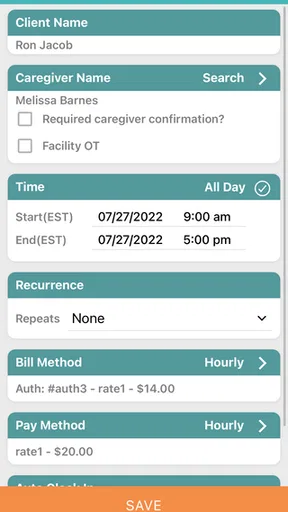
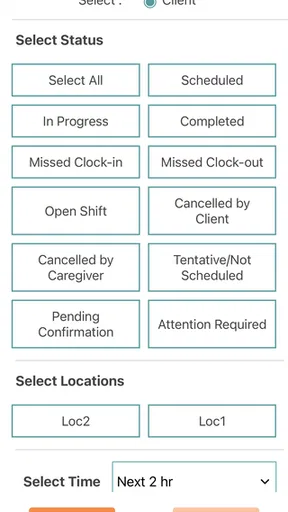
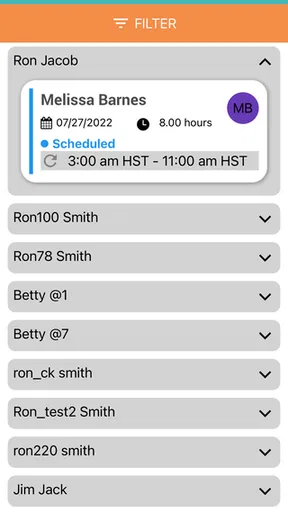
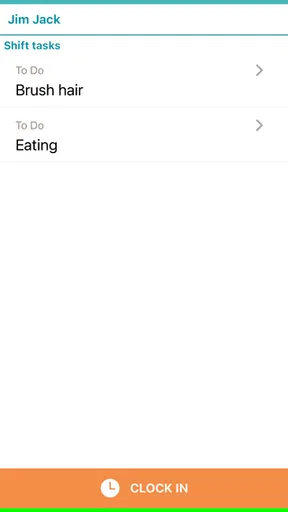
 Analysis by AppCompare
When I judge a care-management app, I start with a practical question: does it help the people coordinating care and the people providing it work from the same plan? WellSky Personal Care is aimed at caregivers and administrators, so it makes the most sense when an agency wants a shared place for day-to-day work rather than a general health app for an individual. It is a free medical app from WellSky Mobile Apps, rated for Everyone, and it has reached over a million installs. Its average rating is 3.6 from around 34,000 ratings, which suggests it is widely used but not universally loved.
Decide by your team’s workflow, not the feature list
Before choosing it, I would map out who needs to do what during a normal shift. An administrator may need to coordinate assignments, while a caregiver needs to check the plan and understand what has changed. The app’s value depends less on having a long menu of tools than on whether those everyday handoffs fit the way your agency already works.
I would also separate agency coordination from personal health tracking. This is not the kind of app I would choose simply to record my own symptoms, manage a family member’s appointments, or look up general medical information. Its audience is people involved in personal care services, and that focus is useful when it matches your role but limiting when it does not.
A sensible first step is to ask the agency administrator how staff accounts, assignments, and client information are handled in their setup. The app is not a shortcut around an agency’s existing process: its usefulness depends on the organization using it and keeping the working information current. If your team cannot agree on where updates belong, adding another app may create an extra place to check rather than simplifying the day.
Getting Started with WellSky Personal Care
Jumping into WellSky Personal Care is pretty straightforward. Once you download the app, you'll be prompted to set up an account. This process is as smooth as butter, taking just a couple of minutes. The interface welcomes you with a clean and organized dashboard, which is a breath of fresh air compared to other cluttered apps in the same category.
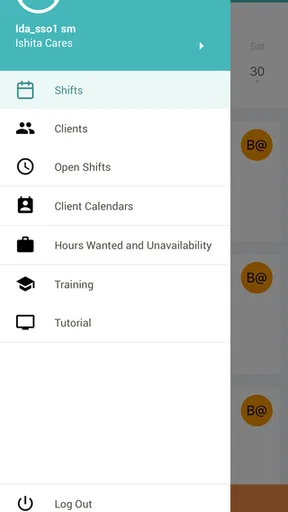
One of the first things I noticed was how intuitive the navigation is. The developers clearly put a lot of thought into making sure everything is just a tap away. Whether you want to check on caregivers’ schedules or update client profiles, it’s all easily accessible.
Features That Stand Out
The app shines with its array of features aimed at making life easier for both administrators and caregivers. Let’s dive into a few that really caught my attention:
Worth Reading Before You Choose

EA SPORTS FC Mobile 26 Is a Bigger Football Game, but It Takes Time

Flipboard Shows What News Apps Must Do Beyond the Feed

Switching to Android Auto Means Rethinking Your Driving Routine

Google Calendar Makes a Crowded Week Easier to Manage

Ludo King Makes the Most of the Minutes Between Plans

Baby Panda World Brings Quick Play to Modern Phones, but Its Game Library Feels Busy
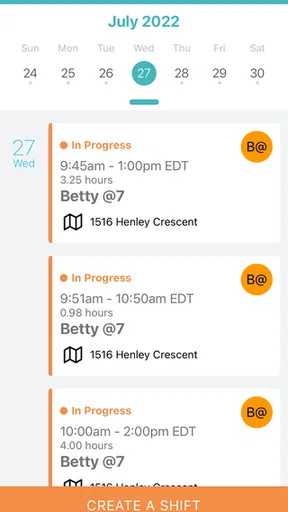
- Schedule Management: You can effortlessly create, update, and track caregiver schedules. The calendar view is particularly nifty, offering a clear snapshot of daily, weekly, or monthly assignments.
- Client Profiles: The app allows you to maintain detailed client profiles, complete with medical histories, preferences, and care plans. It's like having a digital Rolodex at your fingertips.
- Communication Tools: Built-in messaging means you can communicate with caregivers without leaving the app. This feature is super handy for quick updates or reminders.
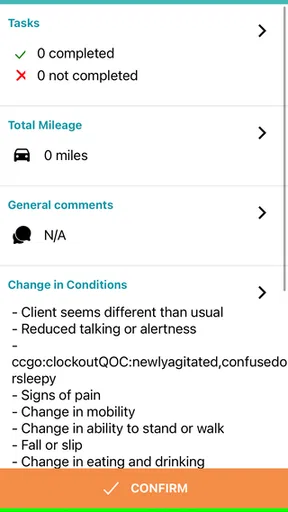
- Reporting and Analytics: The reporting tools offer insights into various metrics, helping you make informed decisions about resources and care strategies.
Where the all-in-one approach helps—and where it asks more of you
The useful detail is not simply that scheduling, client information, communication, and reporting sit together. It is that an agency can use those connected pieces to reduce small handoff gaps. For example, if a client’s preference affects how a visit should be carried out, keeping that information alongside the care plan can make it easier for a caregiver to prepare before arriving. That only works, though, if the profile is maintained and staff know which information is current.
For a realistic morning, imagine an administrator reviewing the day’s assignments, noticing a coverage change, and using the team’s normal process to notify the caregiver. The caregiver can then check the assignment and relevant client details before the visit rather than relying on a loose chain of calls or paper notes. The practical gain is fewer context switches; the trade-off is that staff must make checking the app part of their routine, not assume that an update will reach them automatically.
I would treat client profiles as working records, not as a place to casually duplicate every note from elsewhere. A useful habit is to keep the information that changes how care is delivered easy to find, and to agree within the agency who updates it. This is a non-obvious but important workflow choice: a shared profile can prevent repeated questions, yet an overfilled or stale one can make the key details harder to spot.
User Experience and Interface
The user experience in WellSky Personal Care is top-notch. The app's design is minimalist but functional, focusing on usability rather than unnecessary frills. The color scheme is easy on the eyes, and the fonts are readable, which is crucial for an app used on a daily basis.
Performance-wise, the app runs smoothly across different devices. I tested it on both Android and iOS, and it didn’t skip a beat. Loading times were minimal, and I didn’t encounter any crashes or bugs during my usage. It’s these little things that add up to a seamless user experience.
Fit for agencies, not every caregiver
The strongest fit is an agency where administrators and caregivers both need a shared operational view. A coordinator who is balancing assignments and a caregiver who needs clear client context are likely to get more from it than someone who only wants a personal calendar. Its medical category can sound broad, but its day-to-day purpose is much narrower: supporting personal care work.
It may be the wrong choice for a solo caregiver who does not work with an organization using the system, or for a family member looking for a private tool to organize one person’s care. In those situations, a basic calendar, a shared family organizer, or a dedicated personal health record may be simpler. Those alternatives can be easier to set up for a small household, while they generally do not provide the same agency-centered combination of schedules, client profiles, messaging, and reporting described here.
Compared with paper schedules or scattered messages, a central app can make information easier to revisit and help teams avoid searching through several channels. Compared with a general task manager, its care-oriented records and agency workflow are the reason to consider it. Neither comparison means every agency should switch: if the current process is reliable and staff already have a clear, consistent source of truth, migration may bring more disruption than benefit.
What to check before making it part of the routine
Because this app handles care-related information, I would ask the organization how it expects staff to use and protect that information before relying on it. Confirm which details belong in a client profile, what the team considers an authoritative update, and how a caregiver should proceed if something looks outdated. Those are operational questions rather than reasons to distrust the app; clear answers help prevent a convenient tool from becoming another source of uncertainty.
Another practical check is whether the people who need access can actually use the same workflow. A supervisor may appreciate reporting, but that does not help if caregivers find it difficult to check assignments during a busy day. I would have both roles walk through a typical shift before deciding that the app has improved coordination. The administrator’s view and the caregiver’s experience are different, and both matter.
For newcomers, one question is whether downloading it alone is enough to get started. In practice, the most useful setup is tied to an agency’s way of working, so I would first ask the employer or care organization whether it uses the app and how staff are expected to join. Another question is whether it replaces every existing communication channel. I would not assume that: the team should agree which messages belong in the app and which urgent situations require another established route.
Why It’s a Game Changer
What sets WellSky Personal Care apart from other apps is its commitment to integrating all aspects of personal care into one cohesive platform. It’s not just about scheduling or communication—it's about creating a comprehensive ecosystem that enhances the quality of care provided.
For agencies looking to optimize their operations, this app is a game changer. It reduces the administrative burden, allowing more focus on delivering exceptional care to clients. Plus, the ability to customize features according to your agency's needs is a huge bonus.
Version, value, and the cost of switching
The app is free to download, which makes trying it less of a financial commitment for an individual caregiver. The larger cost is usually the time needed to adjust a team’s habits: agreeing on where to look for updates, keeping client information accurate, and helping staff learn the same routine. A free app can still demand meaningful effort if an organization is changing how it coordinates care.
It was released on September 28, 2017, and its current version is 4.5, with Android support starting at version 7.0. I would check that a device meets that minimum before planning to use it on shift. The version number is also a reason to keep the app updated through the normal device process, rather than assuming an old installation will behave like the current release.
If your agency is considering a switch from paper or another digital system, I would begin with one clearly defined workflow rather than changing everything at once. Pick a recurring coordination task, decide who owns each update, and see whether staff can find the information they need without duplicating it elsewhere. This exposes friction early and makes it easier to tell whether the app is improving the actual handoff or merely relocating it.
Final Thoughts
Wrapping up my review of WellSky Personal Care, I have to say it's an impressive tool for anyone in the personal care industry. The app is designed with the user in mind, offering a range of features that enhance productivity and communication.
If you're part of a personal care agency looking to streamline operations and elevate your care services, this app is definitely worth checking out. It's like having a personal assistant in your pocket, keeping everything running smoothly. I’d suggest giving it a try and seeing how it can fit into your workflow.
So, what are you waiting for? Go ahead and explore the benefits of WellSky Personal Care for yourself. You might just find that it’s the missing piece your agency has been looking for.
My recommendation
I would recommend it to caregivers and administrators whose organization already works with WellSky Personal Care or is prepared to make it a shared part of daily coordination. Its strongest case is bringing schedules, client context, team communication, and reporting into one work-focused environment. The average rating of 3.6, alongside broad adoption, is a reminder to judge the fit for your own team rather than treating popularity as proof that every workflow will suit you.
I would skip it if you need a standalone family organizer, a personal medical diary, or a generic task list; a simpler tool in those categories is likely to be easier to manage. For an agency, I would start by confirming the expected staff workflow and testing a routine handoff with both an administrator and a caregiver. If that makes the day clearer without creating duplicate records, it is worth keeping in the team’s toolkit.
Pros
- User-friendly interface for easy navigation.
- Comprehensive care management features.
- Real-time updates improve communication.
- Customizable care plans for clients.
- Secure data handling ensures privacy.
Cons
- Limited offline functionality available.
- Initial setup can be time-consuming.
- Requires stable internet connection.
- Some features require in-app purchases.
- Occasional syncing issues reported.
FAQs for WellSky Personal Care
What is WellSky Personal Care and what does it offer?
WellSky Personal Care is a comprehensive app designed to streamline the management of home care services. It offers features like scheduling, client tracking, and reporting, all in one platform. This app is particularly useful for care agencies looking to enhance efficiency and improve client satisfaction by organizing their operations more effectively.
Is WellSky Personal Care compatible with both Android and iOS devices?
Yes, WellSky Personal Care is available for both Android and iOS devices. Users can download the app from the Google Play Store for Android devices and the Apple App Store for iOS devices. The app is optimized to work seamlessly across different platforms, ensuring a smooth user experience regardless of your device.
How does WellSky Personal Care ensure data security and privacy?
WellSky Personal Care prioritizes user data security and privacy by implementing robust encryption protocols and adhering to industry standards. The app ensures that sensitive client information is securely stored and accessible only to authorized personnel, providing peace of mind for both care providers and their clients.
Can WellSky Personal Care be used by individual caregivers or is it only for agencies?
While WellSky Personal Care is primarily designed for agencies to manage multiple caregivers and clients, individual caregivers can also benefit from its features. The app allows for efficient scheduling, client tracking, and reporting, making it a versatile tool for anyone involved in personal care services.
What kind of support does WellSky Personal Care offer to its users?
WellSky Personal Care offers comprehensive support to its users, including access to a dedicated customer service team, online resources, and training guides. Users can contact support via email or phone for assistance with any app-related issues, ensuring they have the help they need to maximize the app's capabilities.


